Trascritto
Course 40 - Web Scraping with Python | Episode 41: Mastering GET and POST Form Submissions
21 ago 2026 ·
11 min. 31 sec.
Scarica e ascolta ovunque
Scarica i tuoi episodi preferiti e goditi l'ascolto, ovunque tu sia! Iscriviti o accedi ora per ascoltare offline.
Course 40 - Web Scraping with Python | Episode 41: Mastering GET and POST Form Submissions
Questa trascrizione automatica è offerta da
Sounder.AI
Questa è una trascrizione generata automaticamente. Si prega di notare che non è garantita la completa accuratezza.
Descrizione
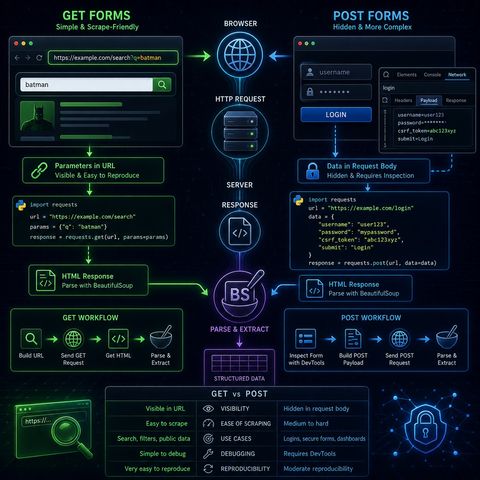
This episode is essentially teaching you how to reverse-engineer web forms into programmatic HTTP requests, which is one of the most important skills in practical scraping.🧭 Core IdeaWeb forms are...
mostra di più
This episode is essentially teaching you how to reverse-engineer web forms into programmatic HTTP requests, which is one of the most important skills in practical scraping.🧭 Core IdeaWeb forms are just structured HTTP requests.So instead of thinking:“I’m filling a form”You should think:“I’m constructing a GET or POST request that mimics what the browser sends”🌐 1. GET Forms (Simple & Scrape-Friendly)🧠 How they work:
You can listen and download our episodes for free on more than 10 different platforms:
https://linktr.ee/cybercode_academy
mostra meno
- User input is appended to the URL
- Parameters are visible in the address bar
- copy the URL directly
- modify query parameters manually
- reproduce requests with requests.get()
- send GET request
- retrieve HTML response
- parse with BeautifulSoup
- data is sent inside the request body
- not visible in the URL
- often used for:
- logins
- government portals
- secure searches
- parameters are hidden
- structure is not obvious from URL
- requires inspecting browser internals
- open Network tab
- submit the form manually
- inspect the request payload
- form fields
- hidden inputs
- request headers
- payload structure
- use BeautifulSoup
- extract structured data
- search engines
- dashboards
- government databases
- login-protected portals (when permitted)
- GET → visible, simple, reusable
- POST → hidden, structured, requires inspection
You can listen and download our episodes for free on more than 10 different platforms:
https://linktr.ee/cybercode_academy
Informazioni

Copyright 2026 - Spreaker Inc. an iHeartMedia Company

Commenti