Trascritto
Copilot Skills - Simply Explained
12 lug 2026 ·
13 min. 16 sec.
Scarica e ascolta ovunque
Scarica i tuoi episodi preferiti e goditi l'ascolto, ovunque tu sia! Iscriviti o accedi ora per ascoltare offline.
Copilot Skills - Simply Explained
Descrizione
https://www.m365.fm/categories/copilot-talk/ Skills are one of Microsoft's most important AI building blocks, yet they're also one of the most misunderstood. Depending on which Microsoft product you're using, the same concept appears...
mostra di più
Copilot Skills are one of Microsoft's most important AI building blocks, yet they're also one of the most misunderstood. Depending on which Microsoft product you're using, the same concept appears under different names, making it difficult to understand where everything fits together. At its core, a Copilot Skill is simply a reusable set of AI instructions. Instead of repeating the same prompt every day, you teach Copilot how to perform a specific task once, and it can automatically reuse those instructions whenever the situation matches. Think of it as creating a specialist that knows exactly how to complete one job consistently every single time.
WHERE COPILOT SKILLS LIVE
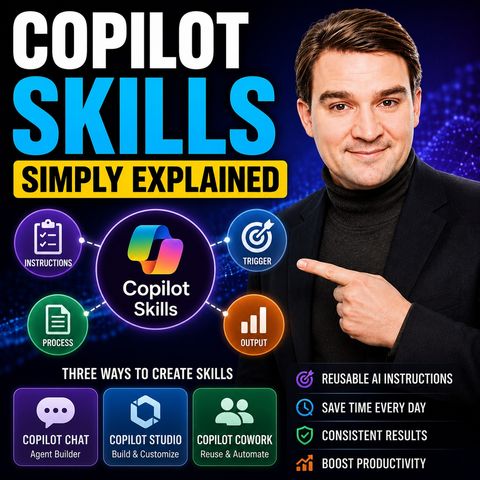
Microsoft currently offers three different places to create and manage skills. The easiest starting point is Copilot Chat, where the Agent Builder allows you to describe a task in plain English and automatically generates a complete skill. No coding, markdown, or configuration is required. For more advanced scenarios, Copilot Studio provides complete control over skill files, workflows, templates, and even Python scripts. Finally, Copilot Cowork stores skills as markdown files inside your OneDrive, allowing reusable business processes to be managed like documents while also performing automated quality checks after creation.
CREATING YOUR FIRST SKILL
Building a skill is surprisingly simple. You describe the task you want Copilot to perform, such as transforming messy meeting notes into structured summaries with action items and decisions. Copilot generates the skill, including its name, trigger description, instructions, and expected output format. After a quick review and some testing, the skill is ready to use repeatedly without having to recreate the prompt each time. For most users, this no-code approach is all that's needed to begin automating repetitive work.
COPILOT STUDIO FOR ADVANCED SCENARIOS
Copilot Studio takes skills much further by allowing developers and power users to package reusable expertise alongside supporting assets. Skills can include markdown instructions, templates, reference documents, and even Python scripts that execute calculations or process uploaded data. Studio also introduces workflows for scenarios that require approvals, deterministic processes, and enterprise automation. This makes Copilot Studio ideal for organizations building production-ready AI solutions rather than simple personal automations.
HOW COWORK USES SKILLS
Copilot Cowork approaches skills as reusable business procedures. Skills are stored inside OneDrive, making them easy to edit, version, and reuse across common business scenarios. Whether generating customer profiles, preparing reports, or processing meeting transcripts, Cowork repeatedly executes the same structured process using predefined instructions and templates. After every skill is created, Cowork evaluates trigger quality, instruction clarity, and robustness to help improve reliability before the skill is used in production.
BUILDING HIGH-QUALITY SKILLS
The best Copilot Skills share several common characteristics. They have clear, descriptive names, precise trigger conditions, concise instructions, and well-defined output formats. Good skills also define rules, exceptions, and edge cases while avoiding overlap with similar skills that could confuse the AI. Like any AI solution, skills improve through testing and iteration. Small adjustments to instructions often produce significantly better and more consistent results.
SKILLS VS. INSTRUCTIONS VS. WORKFLOWS
Understanding the distinction between these three concepts removes much of Microsoft's terminology confusion. Instructions define the agent's overall behavior and are always active. Skills provide reusable expertise for specific tasks and activate only when appropriate. Workflows enforce structured business processes with approvals, conditions, and guaranteed execution order. Together, these three layers allow organizations to create AI assistants that are both flexible and predictable while remaining easy to manage.
WHY COPILOT SKILLS MATTER
Copilot Skills transform AI from a conversational assistant into a repeatable business tool. Instead of writing the same prompts over and over again, organizations can package expertise once and reuse it across projects, teams, and workflows. Whether summarizing meetings, creating reports, processing customer information, or automating repetitive documentation, skills provide consistent, reliable results while dramatically reducing manual effort. As Microsoft continues expanding Copilot across Microsoft 365, mastering Skills will become one of the most valuable ways to standardize AI-powered work throughout the enterprise.
Become a supporter of this podcast: https://www.spreaker.com/podcast/m365-fm-microsoft-365-azure-cloud-power-platform-ai--6704921/support.
mostra meno
WHERE COPILOT SKILLS LIVE
Microsoft currently offers three different places to create and manage skills. The easiest starting point is Copilot Chat, where the Agent Builder allows you to describe a task in plain English and automatically generates a complete skill. No coding, markdown, or configuration is required. For more advanced scenarios, Copilot Studio provides complete control over skill files, workflows, templates, and even Python scripts. Finally, Copilot Cowork stores skills as markdown files inside your OneDrive, allowing reusable business processes to be managed like documents while also performing automated quality checks after creation.
CREATING YOUR FIRST SKILL
Building a skill is surprisingly simple. You describe the task you want Copilot to perform, such as transforming messy meeting notes into structured summaries with action items and decisions. Copilot generates the skill, including its name, trigger description, instructions, and expected output format. After a quick review and some testing, the skill is ready to use repeatedly without having to recreate the prompt each time. For most users, this no-code approach is all that's needed to begin automating repetitive work.
COPILOT STUDIO FOR ADVANCED SCENARIOS
Copilot Studio takes skills much further by allowing developers and power users to package reusable expertise alongside supporting assets. Skills can include markdown instructions, templates, reference documents, and even Python scripts that execute calculations or process uploaded data. Studio also introduces workflows for scenarios that require approvals, deterministic processes, and enterprise automation. This makes Copilot Studio ideal for organizations building production-ready AI solutions rather than simple personal automations.
HOW COWORK USES SKILLS
Copilot Cowork approaches skills as reusable business procedures. Skills are stored inside OneDrive, making them easy to edit, version, and reuse across common business scenarios. Whether generating customer profiles, preparing reports, or processing meeting transcripts, Cowork repeatedly executes the same structured process using predefined instructions and templates. After every skill is created, Cowork evaluates trigger quality, instruction clarity, and robustness to help improve reliability before the skill is used in production.
BUILDING HIGH-QUALITY SKILLS
The best Copilot Skills share several common characteristics. They have clear, descriptive names, precise trigger conditions, concise instructions, and well-defined output formats. Good skills also define rules, exceptions, and edge cases while avoiding overlap with similar skills that could confuse the AI. Like any AI solution, skills improve through testing and iteration. Small adjustments to instructions often produce significantly better and more consistent results.
SKILLS VS. INSTRUCTIONS VS. WORKFLOWS
Understanding the distinction between these three concepts removes much of Microsoft's terminology confusion. Instructions define the agent's overall behavior and are always active. Skills provide reusable expertise for specific tasks and activate only when appropriate. Workflows enforce structured business processes with approvals, conditions, and guaranteed execution order. Together, these three layers allow organizations to create AI assistants that are both flexible and predictable while remaining easy to manage.
WHY COPILOT SKILLS MATTER
Copilot Skills transform AI from a conversational assistant into a repeatable business tool. Instead of writing the same prompts over and over again, organizations can package expertise once and reuse it across projects, teams, and workflows. Whether summarizing meetings, creating reports, processing customer information, or automating repetitive documentation, skills provide consistent, reliable results while dramatically reducing manual effort. As Microsoft continues expanding Copilot across Microsoft 365, mastering Skills will become one of the most valuable ways to standardize AI-powered work throughout the enterprise.
Become a supporter of this podcast: https://www.spreaker.com/podcast/m365-fm-microsoft-365-azure-cloud-power-platform-ai--6704921/support.
Informazioni
| Autore | Mirko Peters M365, Azure & AI |
| Organizzazione | m365 FM |
| Sito | - |
| Tag |

Copyright 2026 - Spreaker Inc. an iHeartMedia Company

Commenti