Trascritto
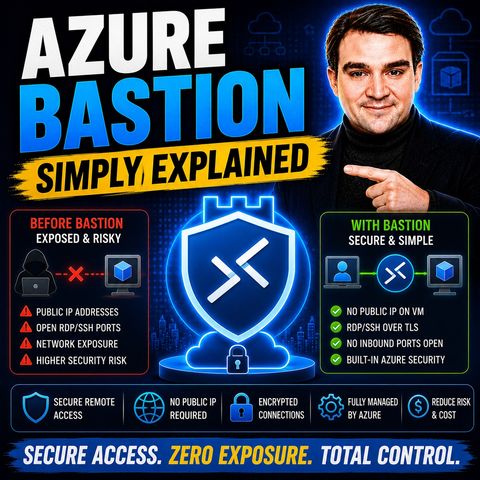
Azure Bastion - Simply Explained
16 lug 2026 ·
11 min. 29 sec.
Scarica e ascolta ovunque
Scarica i tuoi episodi preferiti e goditi l'ascolto, ovunque tu sia! Iscriviti o accedi ora per ascoltare offline.
Azure Bastion - Simply Explained
Descrizione
Every VM with a public IP and an open RDP port is a target, and jump boxes add their own patching burden. This episode explains Azure Bastion for Azure admins...
mostra di più
Every VM with a public IP and an open RDP port is a target, and jump boxes add their own patching burden. This episode explains Azure Bastion for Azure admins and cloud architects: how it works, what the Entra ID integration adds and which SKU fits your budget. You will know how to remove public IPs and move to identity-based VM access.
In this episode
Key takeaways
Worth quoting
“Here's the thing, every exposed port is a target, and ransomware gangs scan for open RDP constantly.” – Mirko Peters (00:24)
“The problem isn't that it can't work. It's that it takes constant work to keep it safe.” – Mirko Peters (01:36)
Explore more on M365.FM
Follow and rate M365.FM in your podcast app, and join the free M365 community at m365con.net.
Become a supporter of this podcast: https://www.spreaker.com/podcast/m365-fm-microsoft-365-azure-cloud-power-platform-ai--6704921/support.
mostra meno
In this episode
- 00:00 – Why open RDP ports are a problem
- 00:47 – The old way: jump boxes and public RDP
- 02:22 – What Azure Bastion is
- 03:43 – How Azure Bastion works
- 05:04 – Entra ID authentication for VM logins
- 06:58 – SKUs, pricing and the real cost of jump boxes
- 08:38 – The big picture
- 09:57 – Getting started with Bastion
Key takeaways
- Azure Bastion is a fully managed service that gives secure RDP and SSH access to Azure VMs over HTTPS, so the VMs need no public IP and no exposed management ports.
- Native Entra ID authentication brings MFA, Conditional Access and Azure RBAC roles to VM logins and removes the need for local accounts and passwords on each machine.
- Choose the Standard or Premium SKU for production, deploy into a dedicated AzureBastionSubnet, remove public IPs and restrict NSGs to the Bastion subnet, starting with your most critical VMs.
Worth quoting
“Here's the thing, every exposed port is a target, and ransomware gangs scan for open RDP constantly.” – Mirko Peters (00:24)
“The problem isn't that it can't work. It's that it takes constant work to keep it safe.” – Mirko Peters (01:36)
Explore more on M365.FM
- Episode page: the full episode with chapters, quotes and FAQ on Azure Bastion
- Azure Bastion – the managed service that replaces public RDP and jump boxes for private VM access over HTTPS
- Microsoft Entra ID – the identity layer that since 2025 lets you sign into Windows VMs without local accounts
- Multifactor authentication (MFA) – the sign-in check that Entra ID brings to VM logins through Bastion, just like for email
- Conditional Access – the policies that now apply to RDP sessions, for example blocking sign-ins from untrusted locations
- Mirko Peters – the host who walks through Azure Bastion, its Entra ID integration and SKUs
- Related episode: Azure Virtual Network - Simply Explained
Follow and rate M365.FM in your podcast app, and join the free M365 community at m365con.net.
Become a supporter of this podcast: https://www.spreaker.com/podcast/m365-fm-microsoft-365-azure-cloud-power-platform-ai--6704921/support.
Informazioni
| Autore | Mirko Peters M365, Azure & AI |
| Organizzazione | m365 FM |
| Sito | www.m365.fm |
| Tag |

Copyright 2026 - Spreaker Inc. an iHeartMedia Company

Commenti